Track WordPress User Activity
See what your logged-in WordPress users are doing, including page visits, last activity, sessions, and engagement history,without digging through raw user data.
Users Insights helps you turn your WordPress user list into a practical activity tracking dashboard. Instead of only knowing who registered, you can see who is active, who has gone quiet, and which users are engaging with your most important pages.
With Users Insights, you can:
- Track logged-in user page visits
- See when users were last active
- View activity in individual user profiles
- Filter users by visited or not visited pages
- Find active and inactive users
- Export filtered user segments
WordPress shows user accounts, not user behavior
The default WordPress Users screen shows basic account data: usernames, emails, roles, and registration dates. But it does not show the activity data site owners actually need to understand engagement.
You can’t easily see who logged in recently, who has gone inactive, which users viewed key pages, or how user behavior connects to purchases, course progress, memberships, or onboarding.
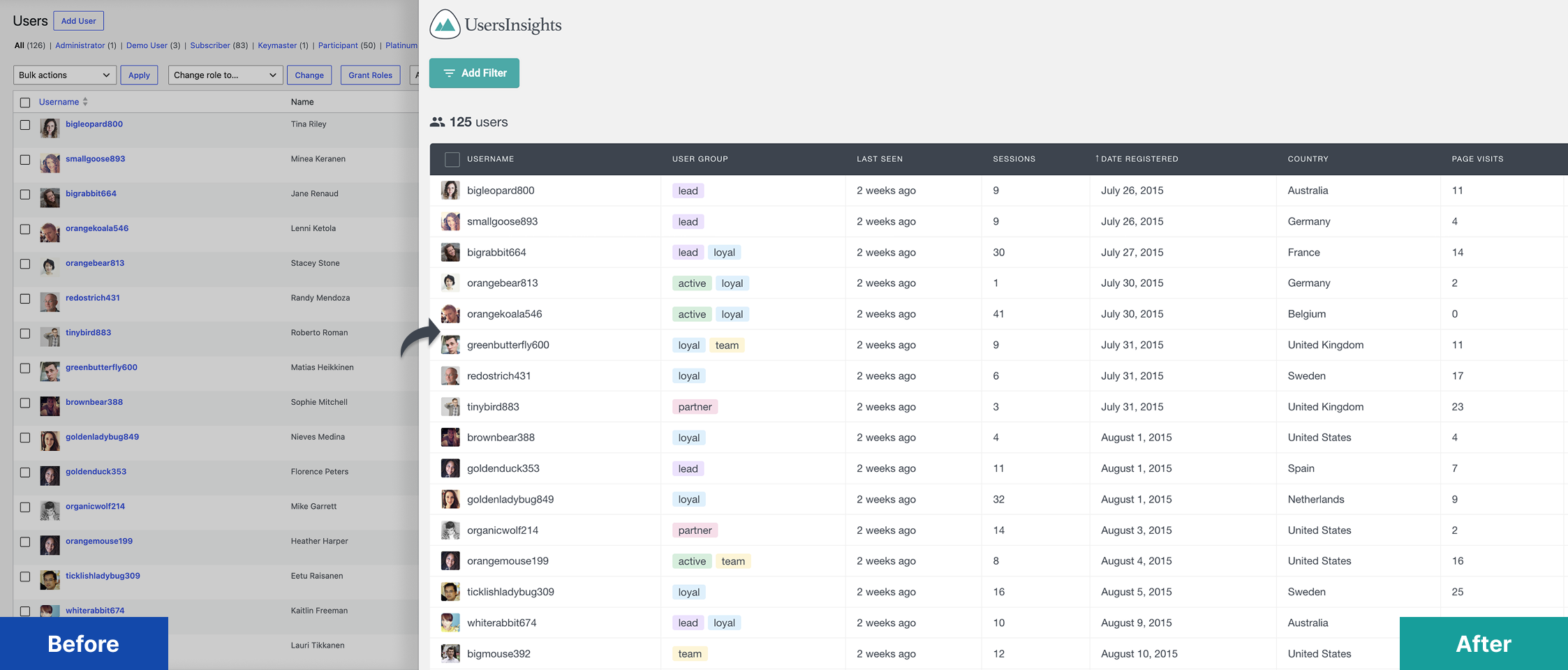
Generic analytics tools show aggregate traffic. Activity log plugins usually focus on security and admin events. Users Insights fills the gap between the two: it helps you understand what your registered WordPress users are doing.
Track logged-in user activity with Users Insights
Users Insights adds user activity tracking directly inside your WordPress dashboard. It helps you see activity data in the same place where you manage, search, filter, and segment your users.
Instead of treating activity as a separate report buried somewhere else, Users Insights connects it to the actual user record.
You can use it to review:
- When each user was last active
- How many tracked sessions are associated with each user
- Which tracked pages a logged-in user has visited
- Which users have or have not viewed specific pages
- How activity differs across roles, groups, locations, customers, students, or members
This is where Users Insights is different from a traditional analytics tool. The goal is not just to count visits. The goal is to help you understand which users are active, what they are doing, and what you should do next.
Users Insights includes features such as Smart Filters, Reports, User Profile Pages, Page Visit Tracking, Device Detection, and Users Sessions. Its Page Visit Tracking feature is specifically designed to find which pages users visit while logged in.
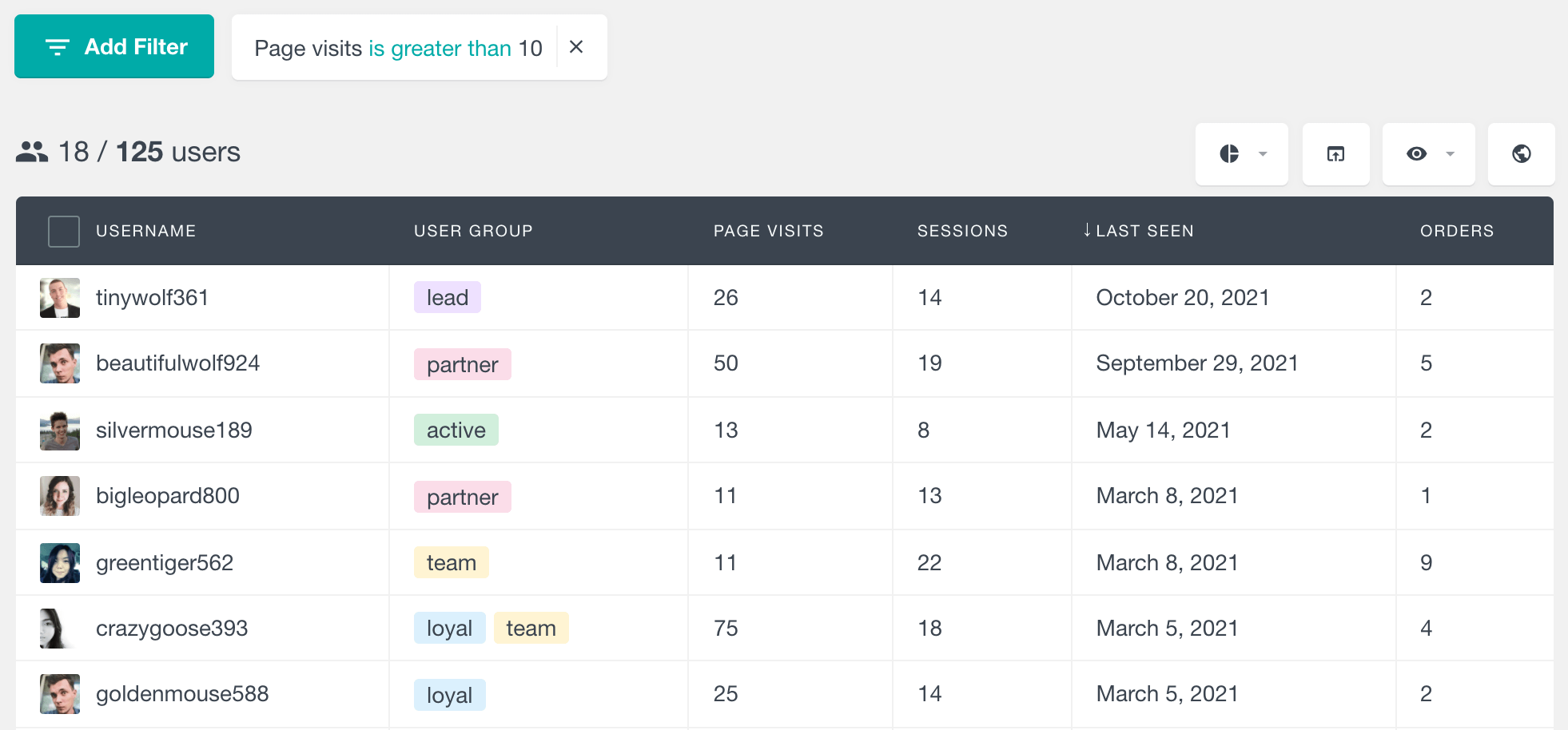
See when each WordPress user was last active
One of the fastest ways to understand engagement is to look at recency.
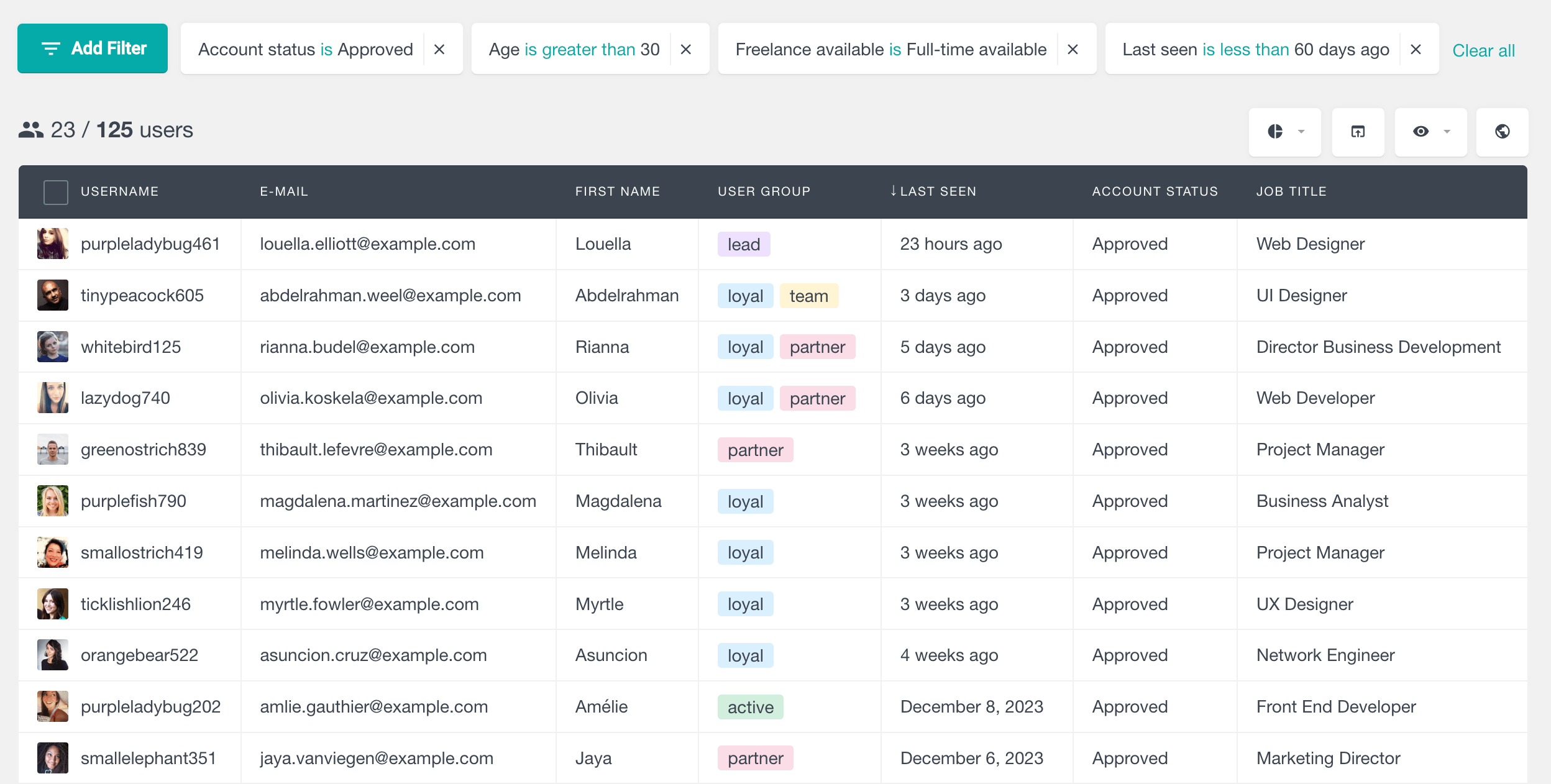
Users Insights includes a Last seen field that shows the most recent time a user was detected as active. This field can be shown in the user table and used as a filter for time-based segments.
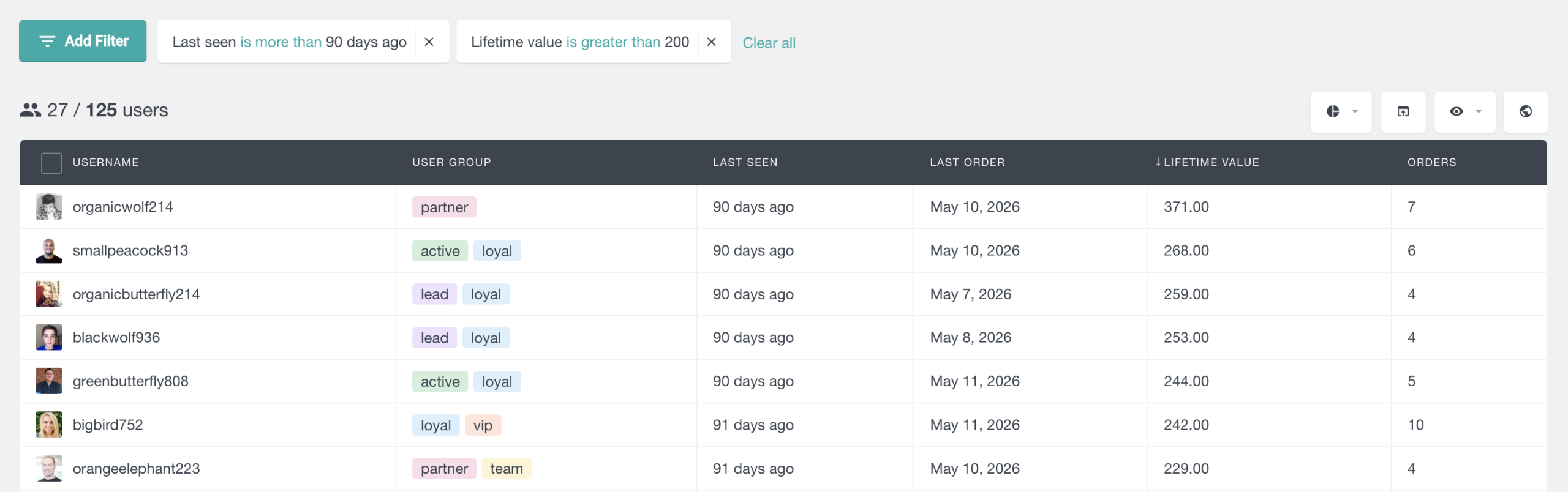
For example, you can use it to find:
- Users active in the last 7 days
- Users inactive for more than 30 days
- Members who have not returned recently
- Students who started but stopped engaging
- Customers who purchased before but have gone quiet
That turns “last login” from a static detail into a working retention tool.
Sort users by recent activity
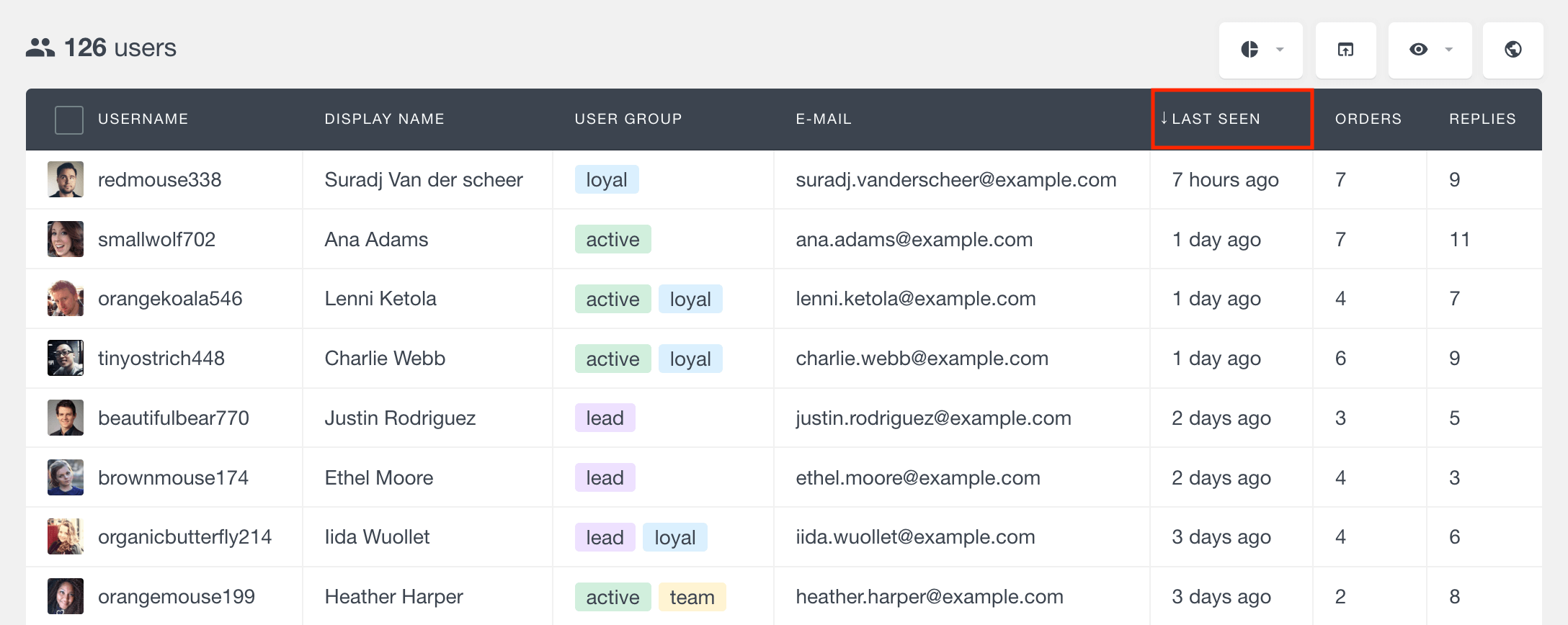
You can sort your users by Last seen to bring the most recently active users to the top. This is useful when you want a quick pulse check on who is currently engaging with your site.
Filter inactive users before they disappear
Sorting is useful when you want to inspect users manually. Filtering is more useful when you want to act.
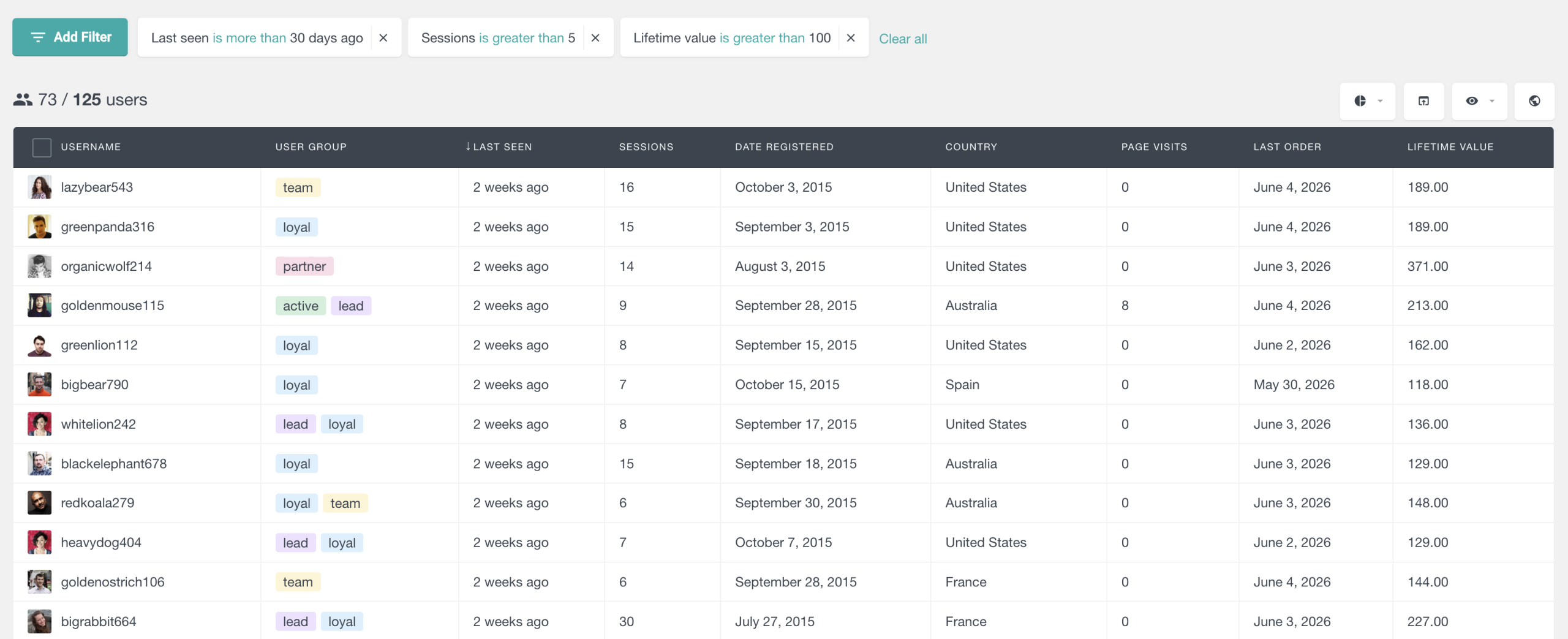
With Smart Filters, you can create segments such as:
- Last seen is more than 30 days ago
- Last seen is less than 7 days ago
- Role is Subscriber and Last seen is more than 60 days ago
- User Group is Trial Users and Last seen is more than 14 days ago
This helps you move from “I wonder who is inactive?” to “Here is the exact list of users we should follow up with.”
Track which pages your users visit
Page views are one of the most important signals of intent.
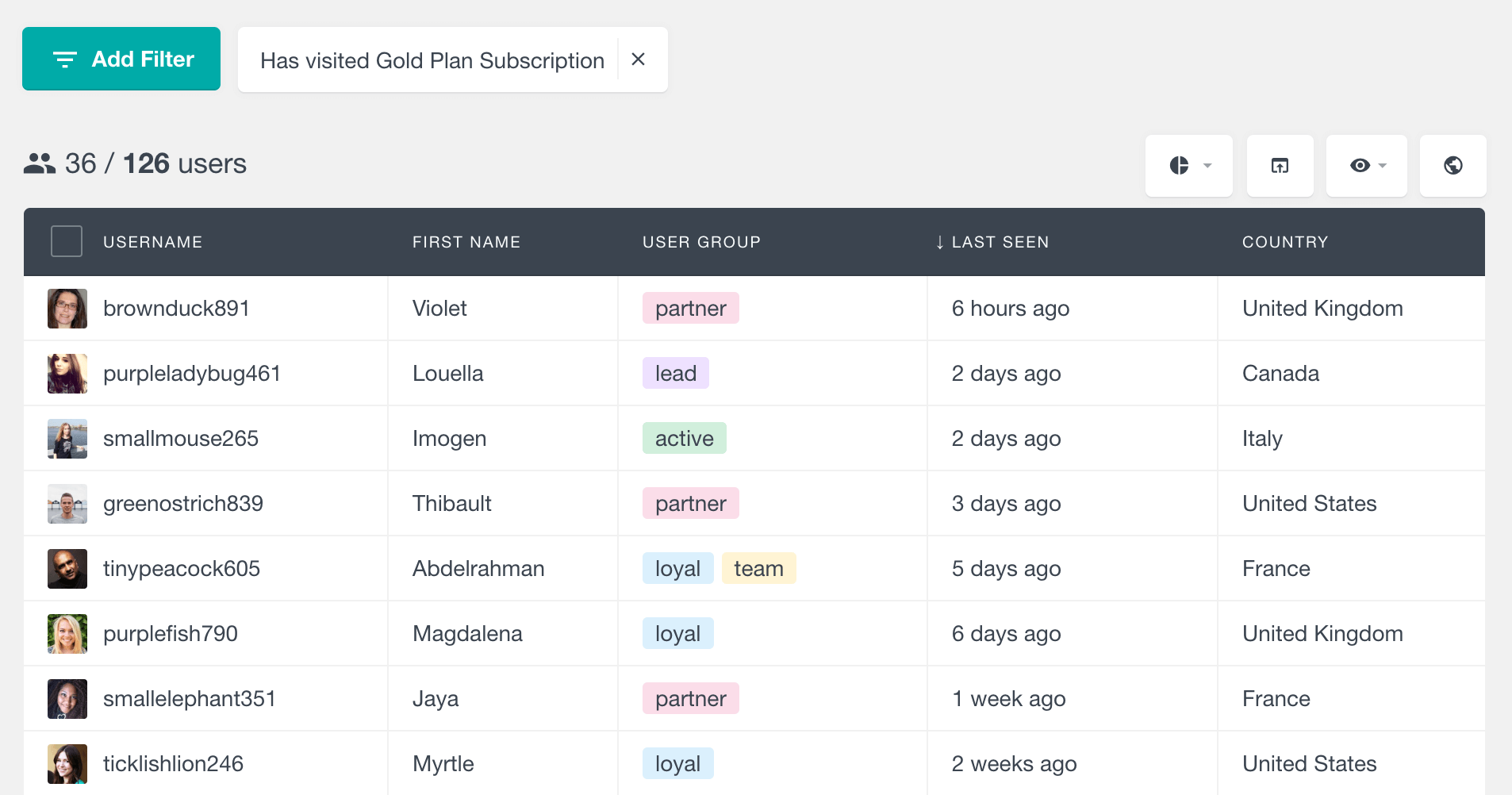
Users Insights’ Page Visit Tracking feature lets you track visits to selected pages and post types for logged-in users. The feature is designed for user-level tracking, so you can connect page visits back to individual WordPress users.
That means you can answer questions like:
- Which users viewed this page?
- Which users have not viewed this page?
- How many times has a user visited a tracked page?
- Which pages does a specific user return to most often?
Find users who visited a specific page
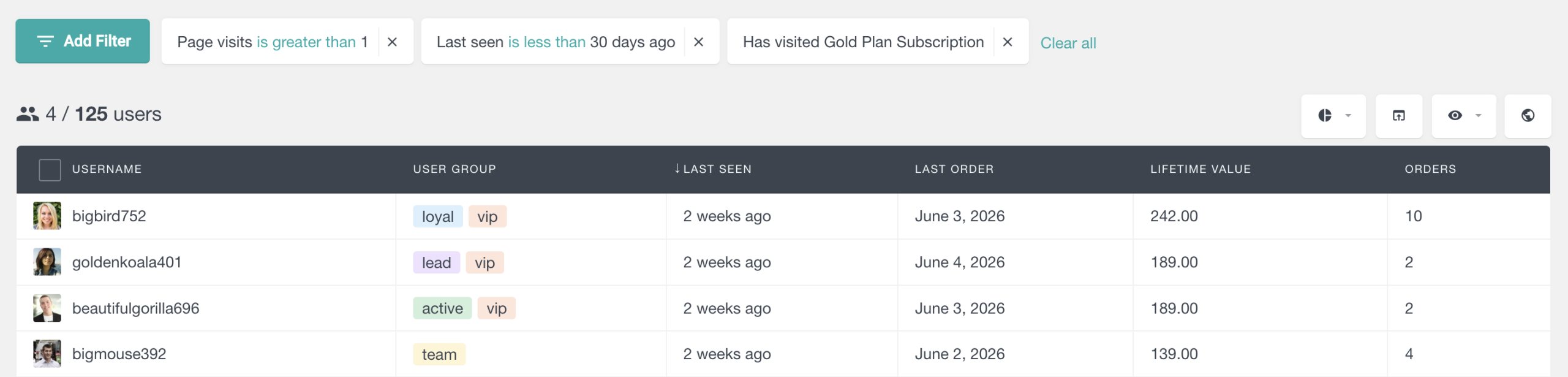
With Users Insights, you can filter users based on whether they visited a specific tracked page.
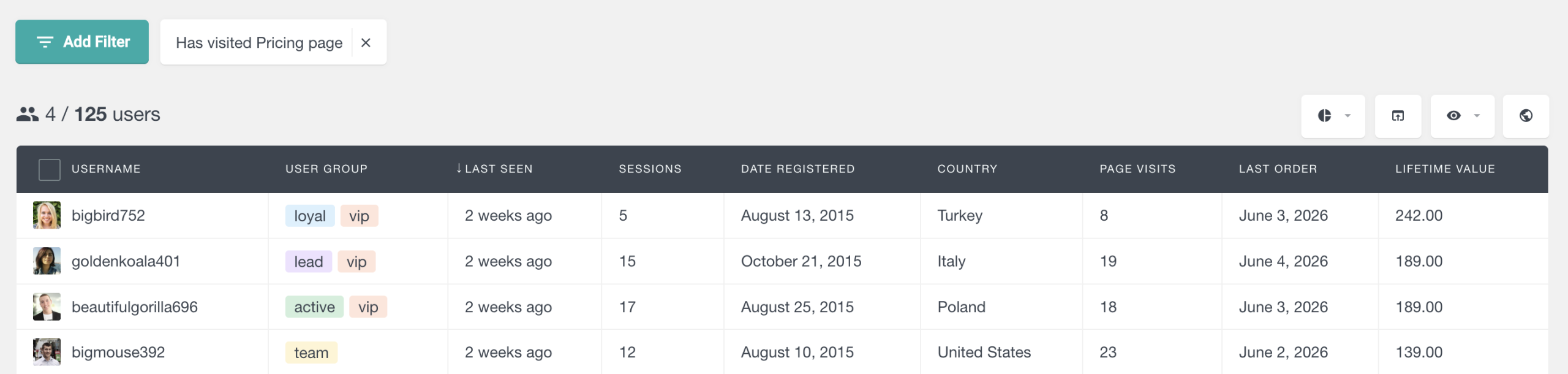
This is useful for high-intent pages and key user journeys:
- Users who visited a pricing page
- Members who viewed onboarding content
- Students who opened an important lesson
- Customers who viewed an upgrade page
- Users who returned to a documentation article multiple times
For example, if you run a membership site, you could find everyone who viewed your “Getting Started” guide. If they viewed it and still contacted support, that may point to a gap in the content. If they never viewed it, you may need to improve onboarding visibility.
Find users who have not visited a specific page
The inverse is often more useful.
A list of users who viewed a page tells you who engaged. A list of users who did not view it tells you where the journey is breaking.
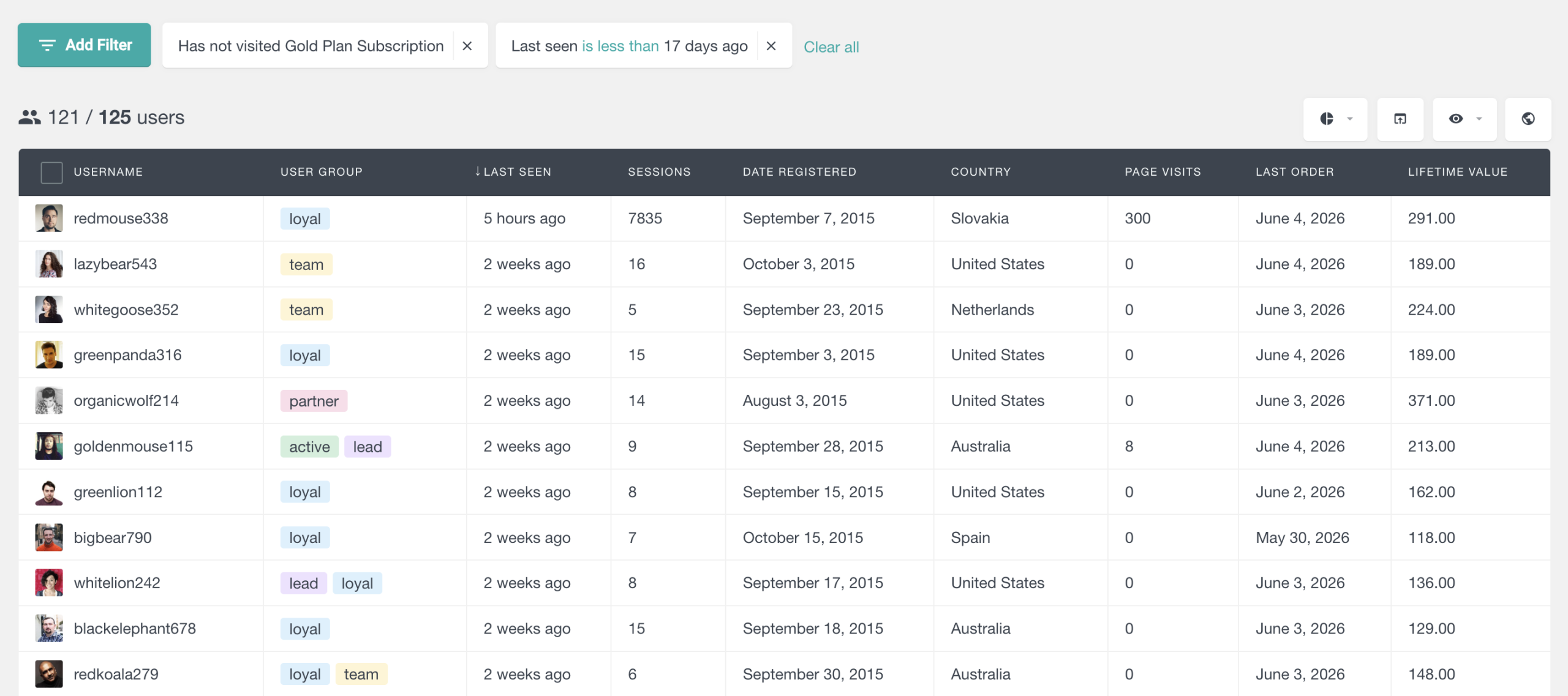
You can use this to find:
- Members who have not viewed onboarding
- Students who have not opened a required lesson
- Customers who have not visited a product update page
- Users who have not read an important announcement
- Trial users who have not visited the setup guide
This is where page visit tracking becomes more than analytics. It becomes a way to find users who need a nudge.
View each user’s activity in one profile
Sometimes you do not need a report. You need context.
A customer emails support. A student says they completed a lesson. A member asks why they did not receive access. A community user reports a confusing experience.
In those moments, you want to open one user profile and see the story.
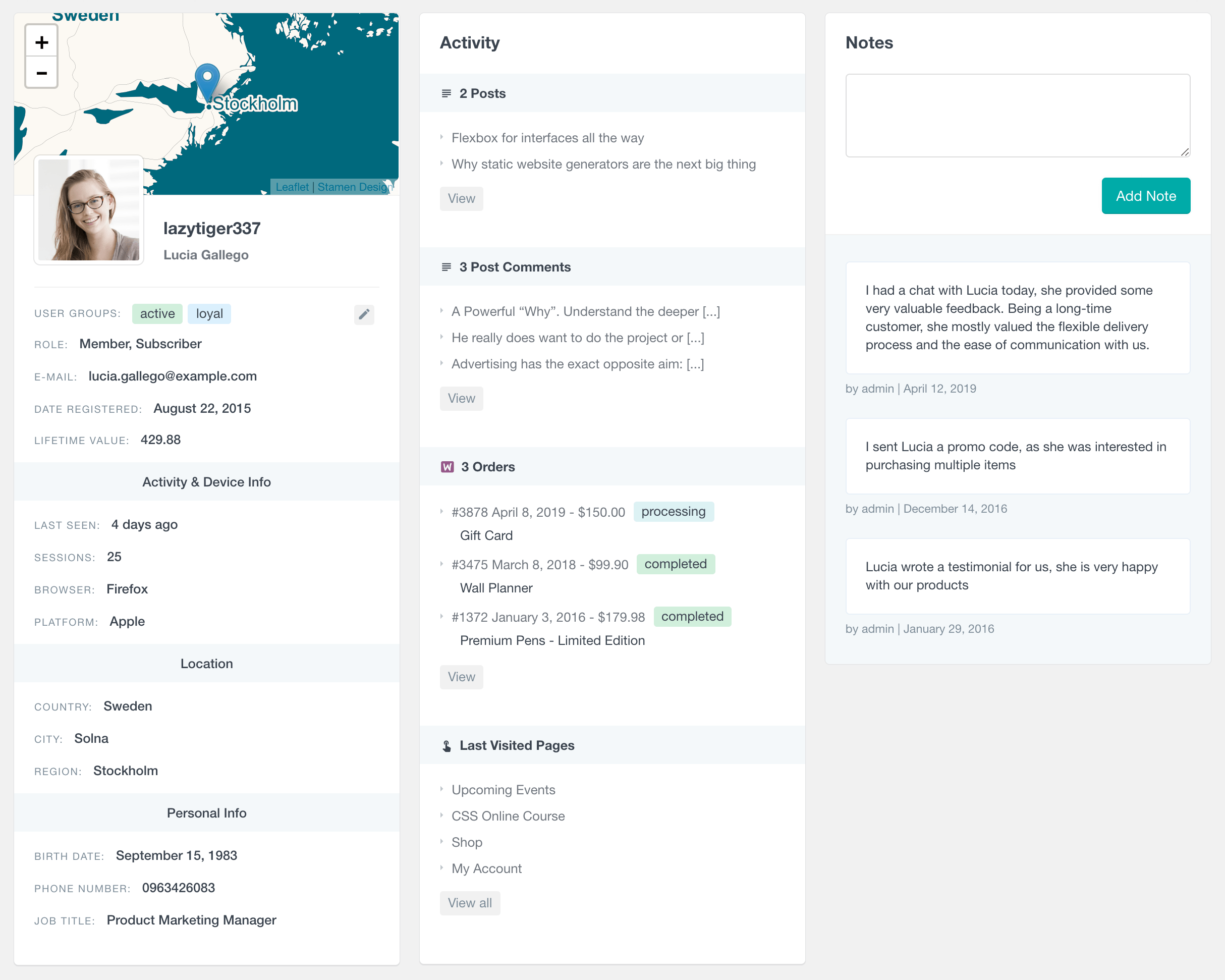
Users Insights User Profile Pages give you a detailed view of each WordPress user. Depending on your active modules and integrations, the profile can include activity data, page visits, notes, groups, WooCommerce orders, LearnDash data, membership activity, form submissions, and other user information. Users Insights describes User Profile Pages as a place for detailed information for each WordPress user.
This makes activity tracking much more useful. You are not just seeing that “someone” visited a page. You can see the visit in the context of the user’s account.
For example:
- Did this user recently log in?
- Did they view the onboarding page?
- Have they purchased before?
- Are they enrolled in a course?
- Are they part of a member group?
- Has your team added internal notes?
That single-user view is especially useful for support, customer success, membership management, and course administration.
See activity fields inside the user profile
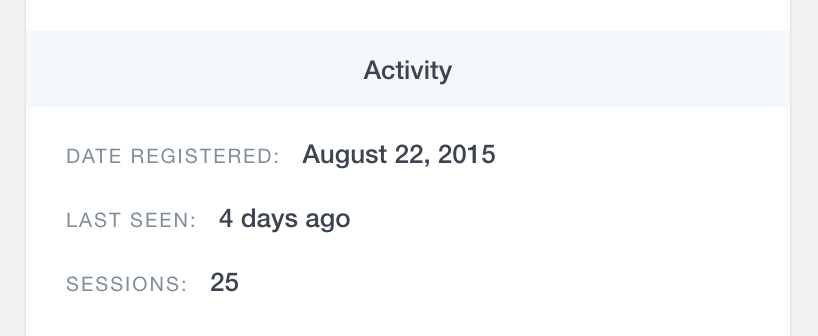
For a quick account-level check, the profile can show useful activity details such as Date Registered, Last Seen, and Sessions.
This helps when you need to answer a simple question quickly: “Has this user actually been active recently?”
[Screenshot placeholder: User profile showing Last seen and Sessions activity fields]
Example:
See page visits inside the user profile
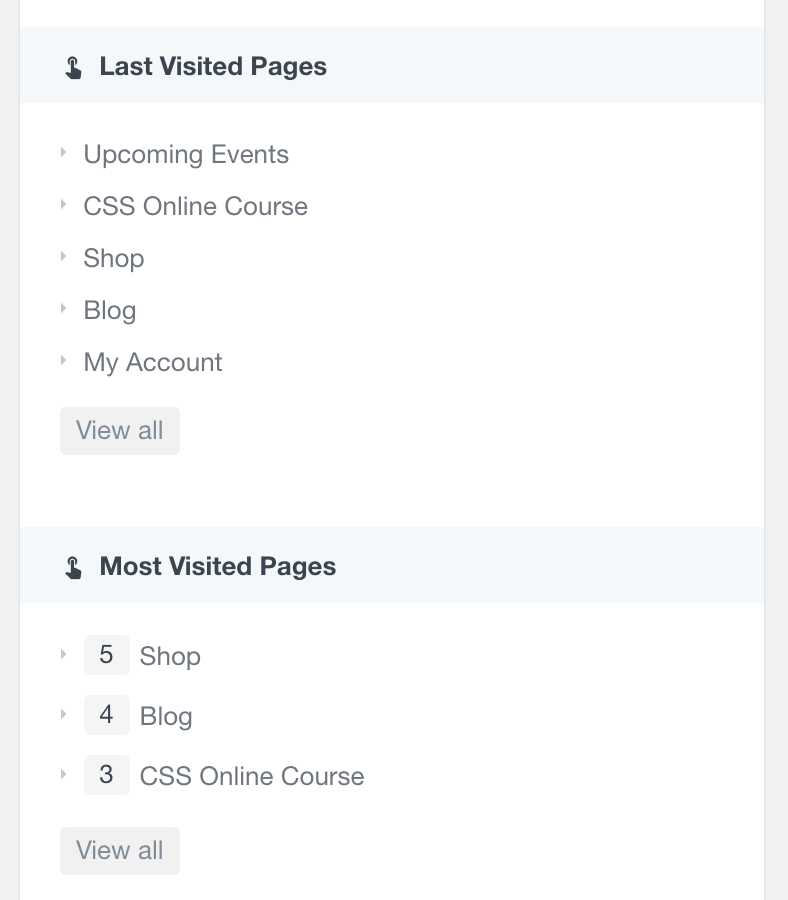
For page-level context, you can also review the user’s visited pages. This is especially useful for support, onboarding, and membership sites where the order of user actions matters.
For example, before replying to a support request, you can check whether the user visited your documentation, onboarding page, account page, or course material.
Turn activity data into useful user segments
Tracking is only valuable if it helps you make better decisions.
A raw activity log can quickly become noise. What matters is the ability to find the right users at the right moment.
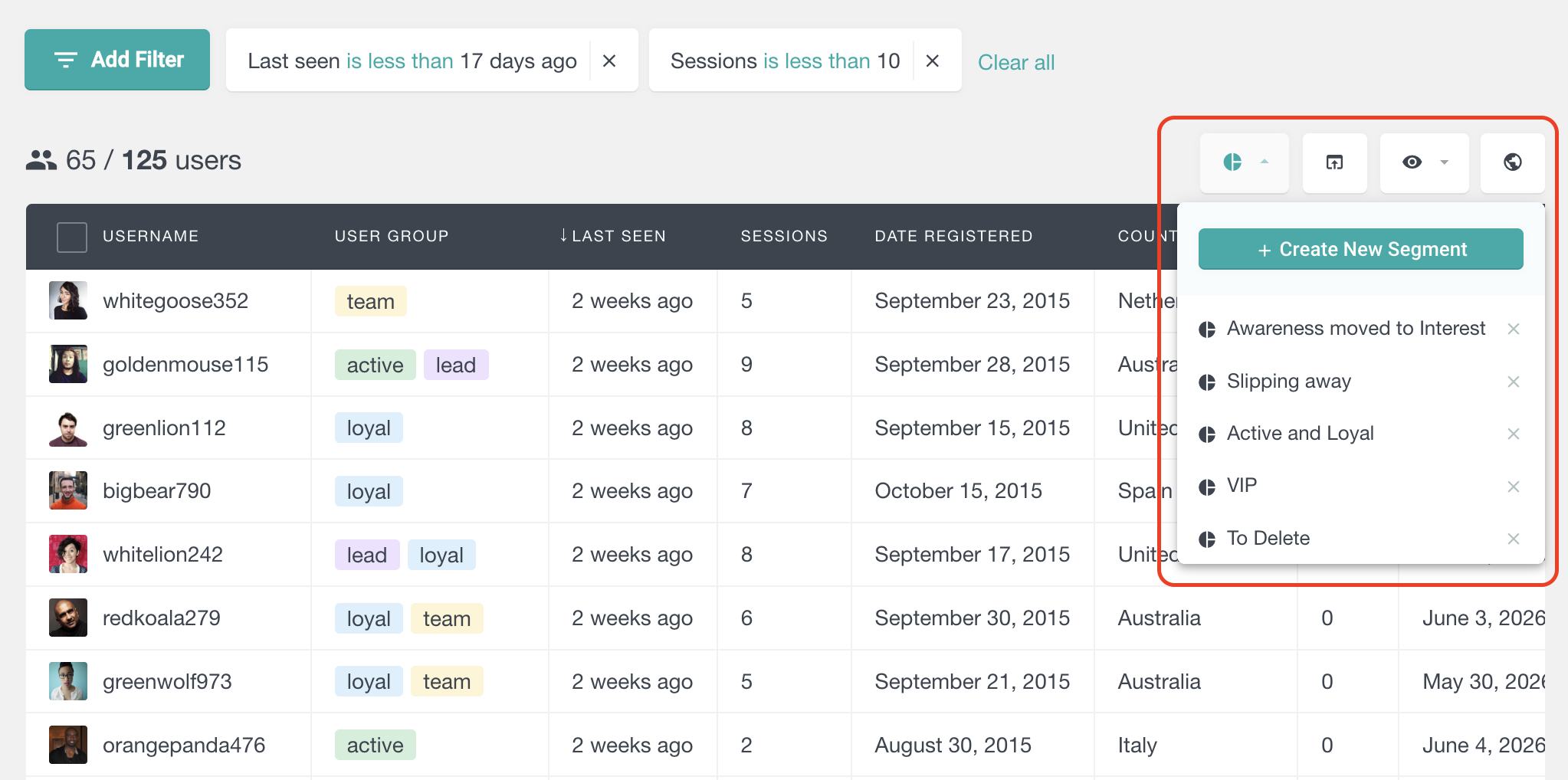
Users Insights Smart Filters let you filter WordPress users by different criteria, apply multiple filters together, and export the filtered selection in CSV format. The filters are stackable, which means you can combine different conditions to narrow your list.
That means you can build segments like:
- Active users in the last 7 days
- Inactive users for 30+ days
- Users who visited a pricing page but did not purchase
- Users who logged in recently but did not view onboarding
- High-value WooCommerce customers inactive for 60+ days
- LearnDash students who logged in but have not completed a course
- Members from a specific plan who have not engaged recently
This is the difference between “tracking activity” and using activity data to run your site better.
Combine activity with other WordPress user data
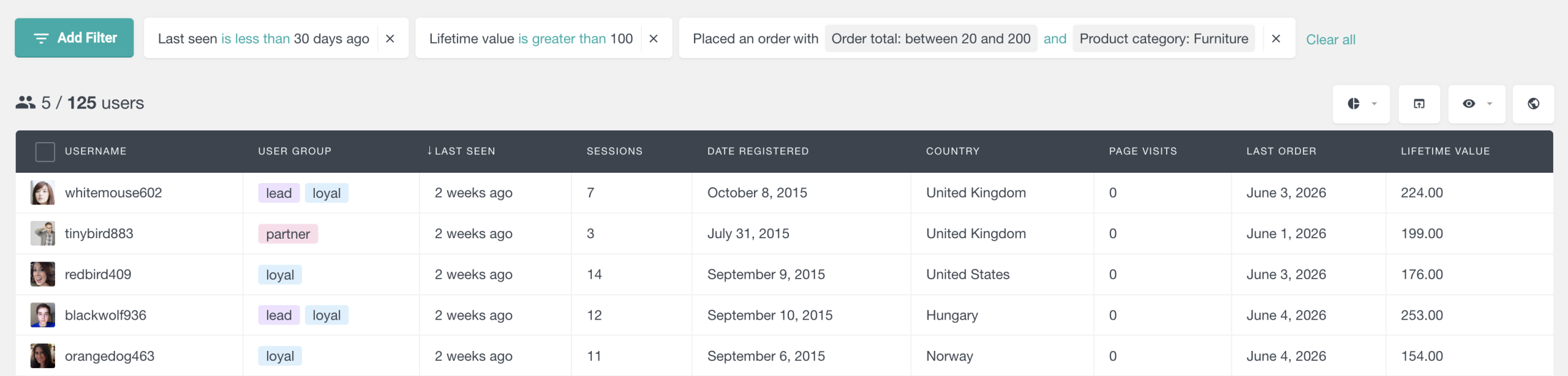
Activity becomes more powerful when you combine it with the rest of your user data.
For example:
- Last seen + Role = inactive subscribers
- Last seen + User Group = disengaged trial users
- Page visit + WooCommerce orders = customers interested in an upgrade
- Sessions + LearnDash progress = students who are active but stuck
- Last seen + Membership status = active members vs members at risk
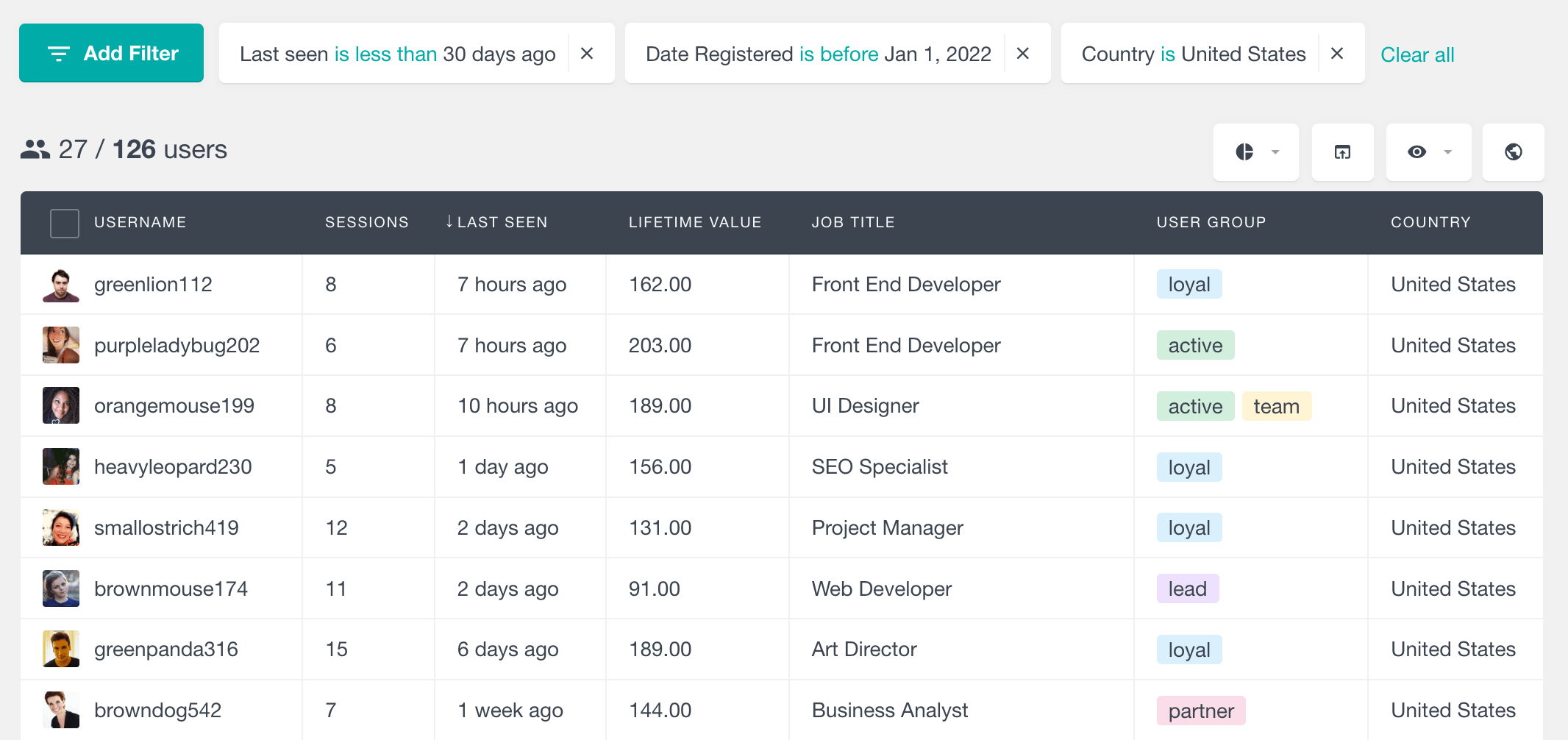
Users Insights supports many fields in the user table and filters, including Last seen and Sessions from the activity module. Sessions show how many tracked sessions are associated with a user, and the field can be shown in the table or used in numeric filters.
Export activity-based user lists
Once you have filtered the right users, you can export the list.
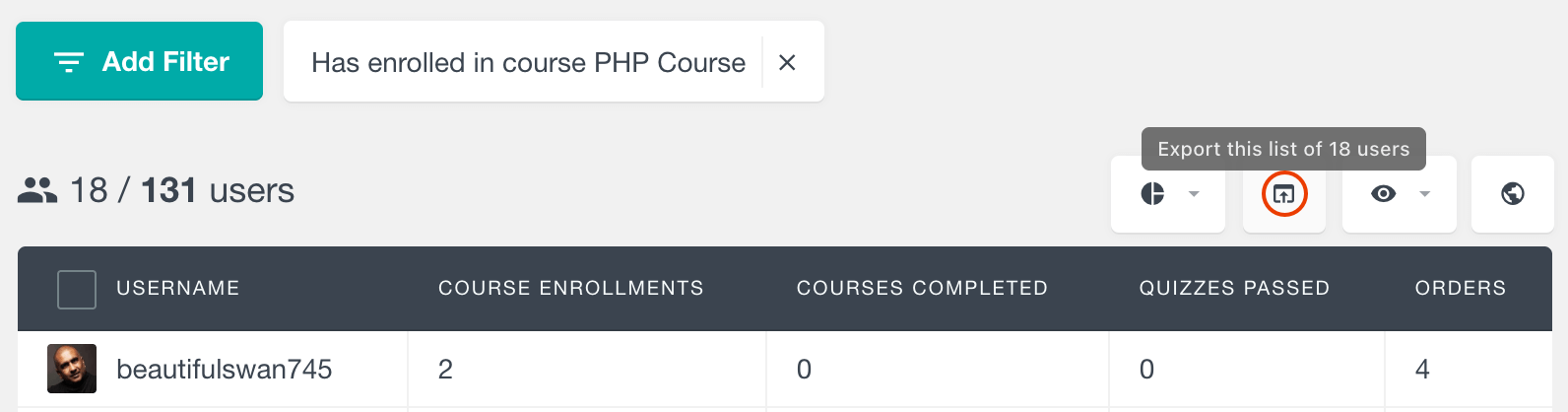
This is useful when you want to:
- Send a re-engagement campaign
- Share a user list with your team
- Build a report for a client
- Analyze user data in a spreadsheet
- Import a segment into another tool
Users Insights’ export feature works with the current state of the user table, so the exported CSV reflects the visible columns and filtered users. The product documentation describes this as a “what you see is what you get” export workflow.
Choose which user activity fields to export
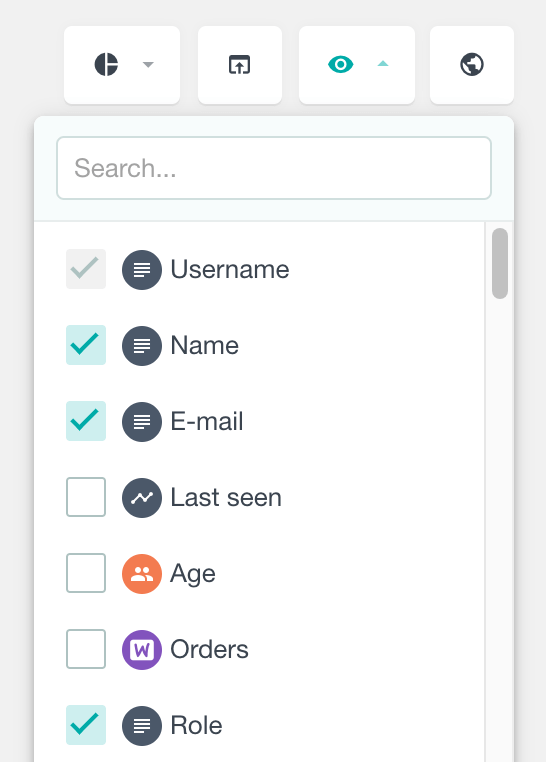
You can also control which fields appear in the user table before exporting. This is useful when you want the export to include only the fields that matter for your workflow.
For example, you might export email address, role, Last seen, Sessions, user group, and selected WooCommerce or LearnDash fields.
Understand activity trends with WordPress user reports
User profiles help you inspect one person. Filters help you build a list. Reports help you see the bigger pattern.
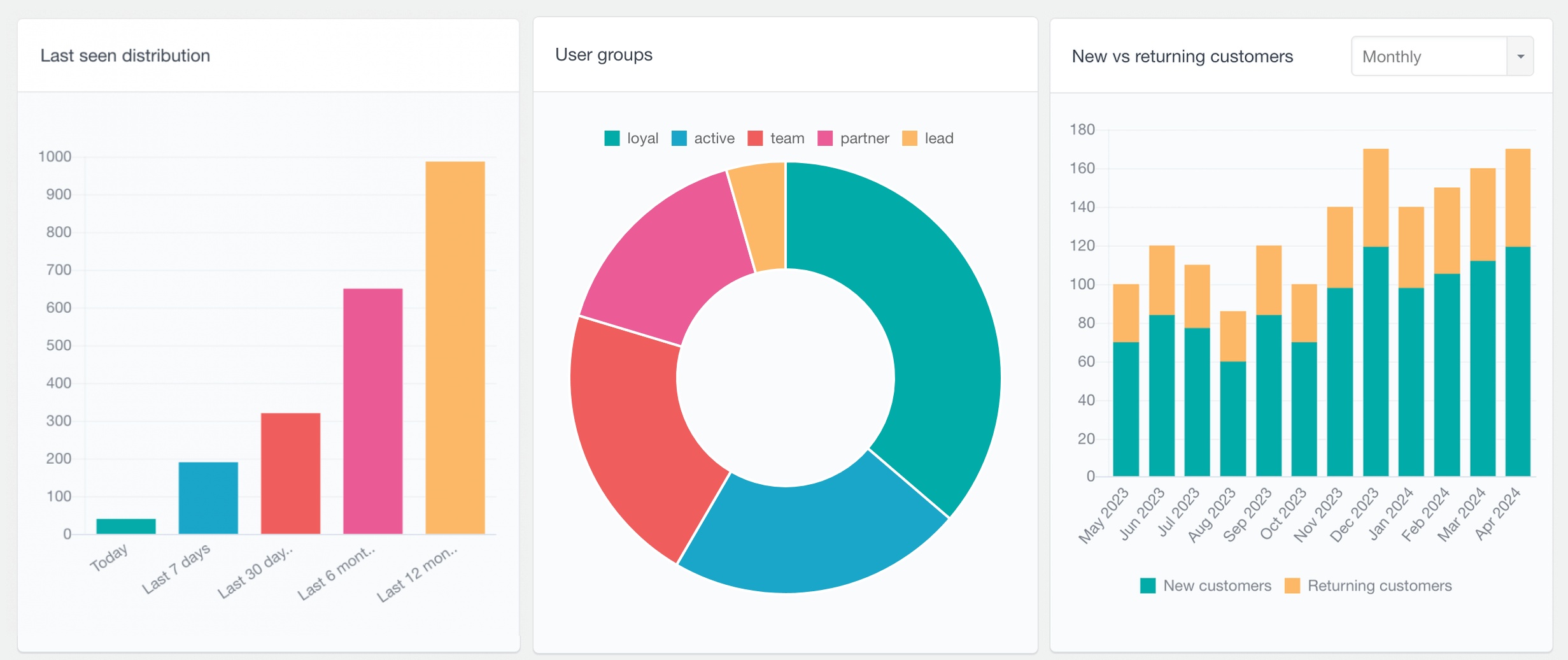
Users Insights includes WordPress reports that visualize user data and help identify trends. The Reports dashboard includes 50+ WordPress reports across different modules and data sources.
For activity tracking, one of the most relevant reports is the Last seen distribution report. It shows how recently users were active across periods such as Today, Last 7 days, Last 30 days, and Last 12 months. This helps you quickly understand whether your user base is active, fading, or in need of re-engagement.
This gives you two levels of insight:
- Reports: What is happening across the whole user base?
- Filters and profiles: Which specific users are behind the trend?
That combination matters. A report may show that many users have not been active in 30 days. Filters let you find them. Profiles let you understand them one by one.
Start tracking WordPress user activity
User activity is one of the clearest signals you have.
It tells you who is engaged, who is drifting away, who has viewed important content, and who may need follow-up.
Users Insights helps you bring that activity data into your WordPress dashboard, connect it to real user profiles, and turn it into practical segments you can act on.
Stop guessing which users are active.
Start tracking logged-in WordPress activity, page visits, sessions, and last seen data with Users Insights.
Frequently asked questions
Can WordPress track user activity by default?
WordPress stores basic user account information, but it does not provide a complete user activity tracking dashboard by default. For last activity, sessions, page visits, and user-level engagement tracking, you need a dedicated plugin such as Users Insights.
Can I track which pages a WordPress user visits?
Yes. Users Insights includes Page Visit Tracking, which helps you find which pages users visit while logged in.
Can I check a user’s last login in WordPress?
Users Insights provides Last seen activity data, which helps you see when a user was most recently active. The Last seen field can be displayed in the user table and used in filters.
[Screenshot placeholder: Last seen column visible in the Users Insights user table]
Example:
Can I find users who have not visited a specific page?
Yes. With Page Visit Tracking and Smart Filters, you can find users who have or have not visited selected tracked pages.
Is Users Insights the same as Google Analytics?
No. Google Analytics is mainly for aggregate traffic analytics. Users Insights is focused on user-level WordPress analytics for registered users, including user profiles, filters, page visit tracking, sessions, reports, and exports.
Can I export user activity data?
Yes. Users Insights lets you export filtered user lists to CSV. The export follows the visible columns and filters in the user table, so you can create custom exports based on the data you are currently viewing.